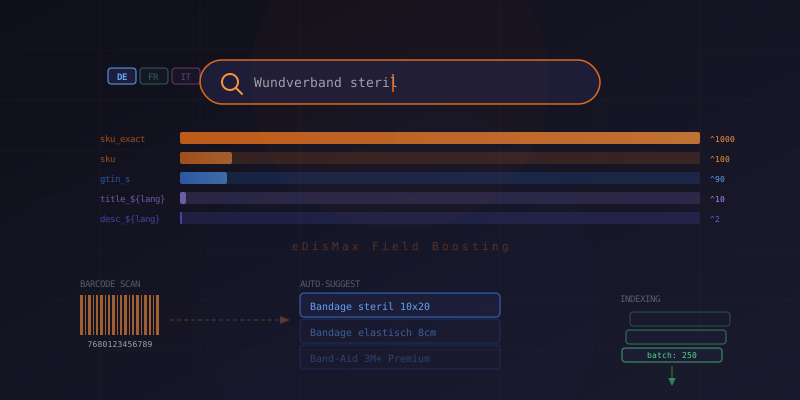
Search is one of those features that seems simple until you build it for real. When your catalog has thousands of products across three languages (German, French, Italian), with SKUs, barcodes, regulatory codes, and customer-specific assortments — a basic text search won't cut it.
In this article, we'll walk through how we built a production search system using Apache Solr for a multilingual B2B e-commerce platform. We'll cover the query architecture, multilingual field boosting, barcode scan handling, auto-suggest, and the indexing pipeline.
Prerequisites
- Node.js >= 18.x
- Apache Solr 8.9+
- Basic understanding of Lucene query syntax
- Familiarity with the Solr eDisMax query parser
Architecture Overview
Our search system has five Solr collections: products, assortments, Posts (news), pages, and academy (events). For CMS content, we create an alias called cms_search_index that spans the news, pages, and events collections — so a single query searches all editorial content.
We don't use an external Solr client library. The entire integration uses the native fetch() API against Solr's HTTP endpoints. This keeps our dependency tree lean and gives us full control over request construction.
Product Search with eDisMax
The core of our search is the eDisMax (Extended Dismax) query parser. It lets us define field-level boosting so that a match on SKU ranks much higher than a match in the description. Here's our query field configuration:
const getProductSearchParams = (lang: Lang, disableBoost = false) => ({
  qf: `sku_exact^1000 sku^100 gtin_s^90 regulatoryNr_s^80 altCode_s^80 \
title_txt_prefix^20 keywords_txt_${lang}^20 title_txt_${lang}^10 \
title_txt_suffix^10 manufacturer_s^6 directAssortments_txt_${lang}^5 \
assortments_txt_${lang}^4 subtitle_txt_${lang}^3 description_txt_${lang}^2`,
  bq: 'inStock_b:true^10',
  sort: `${!disableBoost ? 'boost_i DESC, score DESC,' : 'score DESC, sku_exact DESC,'} sequence_i DESC`,
});
Let's break down the boosting strategy:
- sku_exact^1000 — An exact SKU match should always win. When a buyer types "12345", they want product 12345, not something that mentions "12345" in its description
- gtin_s^90, regulatoryNr_s^80, altCode_s^80 — Product identifiers are precise lookups. High boost, but below SKU
- title_txt_${lang}^10 — Language-specific title fields. The
${lang}suffix selects the correct analyzer (German, French, or Italian) - bq: 'inStock_b:true^10' — A boost query that pushes in-stock products higher without excluding out-of-stock ones
The Search Function
With the parameters defined, the search function itself is straightforward. We escape the query string, build the Solr URL, and parse the response:
import escapeQueryString from './escape.ts';

const doProductsSearch = async (
  queryString: string,
  lang: Lang,
  { fl = 'id' }: { fl?: string } = {},
  disableBoost?: boolean,
) => {
  const cleanedQuery = escapeQueryString(queryString).trim();
  if (!SOLR_URL) return [];

  const { qf, bq, sort } = getProductSearchParams(lang, disableBoost);
  const params = {
    defType: 'edismax',
    q: cleanedQuery,
    qf,
    rows: '2000',
    bq,
    fl,
    sort,
  };

  const uri = `${SOLR_URL}/solr/products/select?${new URLSearchParams(params)}`;

  try {
    const response = await fetch(uri);
    if (!response.ok) {
      throw new Error(`Solr returned ${response.status}`);
    }
    const data = await response.json();
    return data?.response?.docs || [];
  } catch (error) {
    logger.error(error.message);
    return [];
  }
};
A few things to note: we return an empty array on failure rather than throwing, because search failures shouldn't crash the page — they should show "no results." The fl parameter controls which fields Solr returns; by default we only need the id and let our application layer hydrate the full product data from MongoDB.
Query Escaping
Solr uses Lucene query syntax, which means characters like +, -, (, ), :, and * have special meaning. A user searching for "Band-Aid 3M+" would break the parser without escaping:
const escapeQueryString = (query: string): string =>
  query.replace(/[\s\+\-\&\|\!\(\)\{\}\[\]\^\"\~\*\?\:]/g, '\\$&');
We escape all Lucene special characters with a backslash. This is critical for a B2B catalog where product names regularly contain parentheses, slashes, and plus signs.
Barcode Scanning
B2B buyers often scan product barcodes to reorder supplies. This creates a different search mode — the input is a precise identifier, not a fuzzy text query. We handle this with a two-stage lookup:
export const doScanProductSearch = async (
  code: string,
  { fl = 'id' }: { fl?: string } = {},
) => {
  if (!SOLR_URL) return [];

  const normalized = normalizeScanCode(code);
  if (!normalized) return [];

  // Stage 1: Exact match against normalized scan codes
  const exact = await solrSelect(
    `scancode_ss:${escapeQueryString(normalized)}`,
    fl,
  );
  if (exact.length > 0) return exact;

  // Stage 2: Fallback to packaging-agnostic GTIN core
  const core = gtinCore(code);
  if (!core) return [];
  return solrSelect(`scancode_core_ss:${escapeQueryString(core)}`, fl);
};
The first stage looks for an exact match against the scancode_ss multi-valued field, which stores normalized GTINs and alternate product codes. If that misses — for example, when scanning a base unit that's stored under a different packaging level — we fall back to scancode_core_ss, which strips the packaging indicator from the GTIN to find the same item regardless of packaging.
Code Normalization
Barcodes come in messy formats. A 14-digit GTIN needs to be normalized to 13-digit EAN by stripping the leading zero. Alternate product codes need leading zeros removed. We handle all of this in a normalization layer:
// GTIN: extract digits, strip leading zeros (14-digit → 13-digit EAN)
// Alt code: numeric identifier, strip leading zeros
// GTIN Core: 12-digit item reference (packaging-agnostic fallback)
This normalization runs both at index time (when we build the scancode_ss field) and at query time (when we process the scanned code). This ensures the same normalization produces matching values on both sides.
Auto-Suggest
For autocomplete, we use Solr's built-in Suggester component with language-specific infix suggesters:
const doAutoSuggestProducts = async (
  query: string,
  lang: Lang,
  limit = 20,
) => {
  const dictionary = `${lang}-InfixSuggester`;
  const uri = `${SOLR_URL}/solr/products/suggest?${new URLSearchParams({
    'suggest.q': query,
    'suggest.dictionary': dictionary,
    'suggest.count': String(limit),
  })}`;

  const response = await fetch(uri);
  const data = await response.json();

  const suggestions = data?.suggest?.[dictionary]?.[query]?.suggestions || [];
  return [...new Set(suggestions.map((s) => s.term))];
};
Each language gets its own dictionary (de-InfixSuggester, fr-InfixSuggester, it-InfixSuggester) configured in solrconfig.xml. The infix strategy means typing "band" matches "Bandage" and "Armband" — not just prefix matches. We deduplicate results with a Set since Solr may return the same term from different source documents.
Indexing Pipeline
Products are indexed in batches of 250 using Solr's Update API. We use a simple fetch wrapper for all write operations:
const doSolrRequest = async (collection: string, body: unknown) => {
  const url = `${SOLR_URL}/solr/${collection}/update?commit=true`;
  const response = await fetch(url, {
    method: 'POST',
    headers: { 'Content-Type': 'application/json' },
    body: JSON.stringify(body),
  });
  return response.json();
};
Each product document is structured with language-suffixed fields:
{
  id: "product-12345",
  collection_s: "products",
  sku: "12345",
  sku_exact: "12345",
  gtin_s: "7680123456789",
  altCode_s: "1234567",
  scancode_ss: ["7680123456789", "1234567"],
  scancode_core_ss: ["768012345678"],
  inStock_b: true,
  boost_i: 0,
  title_txt_de: "Industrieventil DN50 Edelstahl",
  title_txt_fr: "Vanne industrielle DN50 inox",
  title_txt_it: "Valvola industriale DN50 inox",
  title_txt_prefix: "Industrieventil",
  keywords_txt_de: ["ventil", "edelstahl", "industrie"],
  directAssortments_txt_de: "Industrie > Ventile",
  assortmentsIds_ss: ["cat-100", "cat-101", "cat-102"],
  last_modified: "2025-06-01T00:00:00Z"
}
The title_txt_prefix field stores the first word of the title for prefix matching, and _txt_suffix stores the last meaningful word. This helps when users type partial product names. The *_txt_${lang} fields use Solr's language-specific text analyzers with stopwords, stemming, and synonym support for each language.
Full Reindex vs. Incremental
We support two indexing modes. A full reindex creates timestamped collections and swaps aliases atomically — no downtime. Incremental indexing runs after bulk imports and updates only changed documents. A cleanup step removes documents whose last_modified timestamp is older than the current run, catching deleted products.
Configset Management
Solr schema changes (field types, analyzers, synonym dictionaries) are managed through a configset that lives in version control. On reindex, we zip the configset, upload it via the Admin API, and create collections from it:
// Upload: POST /solr/admin/configs?action=UPLOAD&name=ecommerce_{timestamp}
// Create collection: POST /solr/admin/collections?action=CREATE&name=products&collection.configName=ecommerce_{timestamp}
// Create alias: POST /solr/admin/collections?action=CREATEALIAS&name=cms_search_index&collections=events,news,pages
This means our Solr schema is reproducible from code. No manual Solr admin UI changes that drift from what's in git.
Graceful Fallback
Not every environment needs Solr. Development machines and staging environments without a Solr instance fall back to an in-memory local search plugin:
if (process.env.SOLR_URL) {
  plugins.push(solrProductsSearch);
  plugins.push(solrAssortmentsSearch);
} else {
  plugins.push(localSearch);
}
This conditional loading is handled at the plugin registration level, so the rest of the application doesn't need to know which search backend is active.
Conclusion
Building multilingual e-commerce search is a layered problem. The query layer (eDisMax with field boosting) handles relevance. The normalization layer handles messy real-world inputs like barcodes. The indexing pipeline handles scale. And the configset-as-code pattern handles maintainability.
The biggest lesson: don't treat search as a single feature. Text search, identifier lookup, barcode scanning, and auto-suggest are fundamentally different query modes that need different strategies, even when they hit the same Solr index.