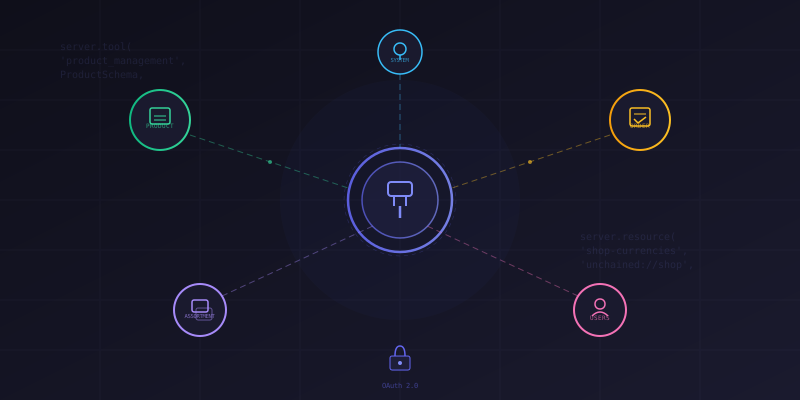
Most AI integrations with e-commerce platforms stop at "generate a product description." We wanted to go further — give AI agents the ability to manage an entire commerce backend: create products with multilingual texts, analyze sales trends, build assortment hierarchies, configure payment providers, and manage customer accounts.
We built this as a native Model Context Protocol (MCP) server inside Unchained Commerce, our open-source e-commerce engine. In this article, we'll walk through the architecture: how we expose commerce domain operations as MCP tools, use MCP Resources for shop configuration, handle authentication via OAuth, and why we chose the Streamable HTTP transport over stdio.
Prerequisites
- Node.js >= 18.x
- TypeScript with ESM support
- Familiarity with the Model Context Protocol
@modelcontextprotocol/sdk(server + types)- Fastify (or any HTTP framework)
Why MCP for E-Commerce?
Unchained Commerce already has a GraphQL API. Why add MCP on top? Because GraphQL is designed for frontend developers who know the schema. An AI agent doesn't have that context. It doesn't know that creating a product requires checking available currencies first, or that prices are stored as integers with currency-specific decimal points, or that assortment links need explicit sort orders.
MCP tools carry all of this context in their descriptions and Zod schemas. The agent reads the tool definitions and understands the domain constraints before making a single call. This is fundamentally different from pointing an LLM at a GraphQL schema and hoping for the best.
Architecture: HTTP Transport with Sessions
Unlike most MCP examples that use stdio transport (great for local dev tools), we use Streamable HTTP transport. Our MCP server runs as part of the Unchained API server — it's a route handler, not a subprocess. This means it shares the same authentication, database connections, and module context as the GraphQL API.
import { StreamableHTTPServerTransport }
  from '@modelcontextprotocol/sdk/server/streamableHttp.js';
import { McpServer } from '@modelcontextprotocol/sdk/server/mcp.js';
import { isInitializeRequest } from '@modelcontextprotocol/sdk/types.js';

const transports: Record<string, StreamableHTTPServerTransport> = {};

const mcpHandler = async (req, res) => {
  if (!req.unchainedContext.user) {
    res.status(401);
    return res.send({
      error: 'invalid_token',
      resource_metadata: `${ROOT_URL}/.well-known/oauth-protected-resource`,
    });
  }

  const sessionId = req.headers['mcp-session-id'];

  if (sessionId && transports[sessionId]) {
    // Reuse existing transport for this session
    await transports[sessionId].handleRequest(req.raw, res.raw, req.body);
    return;
  }

  if (!sessionId && isInitializeRequest(req.body)) {
    // New session: create transport, register tools, connect
    const transport = new StreamableHTTPServerTransport({
      sessionIdGenerator: () => crypto.randomUUID(),
      onsessioninitialized: (id) => { transports[id] = transport; },
    });

    transport.onclose = () => {
      if (transport.sessionId) delete transports[transport.sessionId];
    };

    const server = createMcpServer(
      new McpServer({ name: 'Unchained MCP Server', version: '1.0.0' }),
      req.unchainedContext,
      req.unchainedContext.user.roles,
    );

    await server.connect(transport);
    await transport.handleRequest(req.raw, res.raw, req.body);
  }
};
Each authenticated user gets their own MCP session with a UUID. The session persists across requests via the mcp-session-id header. When the session closes, we clean up the transport. This means multiple AI clients can connect simultaneously, each with their own tool state and permissions.
Role-Based Tool Registration
Not every user should be able to manage products or view order analytics. We gate tool registration on user roles:
export default function createMcpServer(server, context, roles) {
  if (!roles?.includes('admin')) {
    return server;
  }

  registerLocalizationResources(server, context);
  registerProductTools(server, context);
  registerAssortmentTools(server, context);
  registerOrderTools(server, context);
  registerFilterTools(server, context);
  registerProviderTools(server, context);
  registerQuotationTools(server, context);
  registerUsersTools(server, context);
  registerSystemTools(server, context);
  registerLocalizationTools(server, context);

  return server;
}
Currently we gate on the admin role, but the pattern supports fine-grained control — you could register only order-viewing tools for support staff, or only product tools for catalog managers.
The Unified Action Pattern
Instead of registering dozens of individual tools (which would overwhelm the agent's tool list), we group related operations into unified management tools. Each domain gets a single tool with an action parameter that selects the operation:
server.tool(
  'product_management',
  'Unified product management: CREATE, UPDATE, REMOVE, GET, LIST, COUNT, '
  + 'UPDATE_STATUS (publish/unpublish), ADD_MEDIA, REMOVE_MEDIA, '
  + 'CREATE_VARIATION, ADD_ASSIGNMENT, SIMULATE_PRICE, and more.',
  ProductManagementSchema,
  async (params) => productManagement(context, params),
);
The schema uses Zod's z.enum() for the action and makes other fields optional. Each action has its own validator that runs inside the handler:
export async function productManagement(context, params) {
  const { action, ...actionParams } = params;

  if (!(action in actionHandlers)) {
    throw new Error(`Unknown action: ${action}`);
  }

  // Validate params specific to this action
  const parsedParams = actionValidators[action].parse(actionParams);
  const data = await actionHandlers[action](context, parsedParams);

  return createMcpResponse({ action, data });
}
This pattern gives us 9 tools instead of 100+, while keeping full type safety. Each action handler is a separate file — handlers/createProduct.ts, handlers/listProducts.ts, etc. — so the codebase stays maintainable.
MCP Resources for Shop Configuration
One of the most useful MCP features is Resources — read-only data the agent can reference without calling a tool. We expose shop configuration as resources so the agent always knows what languages, currencies, and countries are available:
server.resource(
  'shop-languages',
  'unchained://shop/languages',
  {
    description: 'Available languages configured in the shop. '
      + 'Use these ISO codes when creating or updating products.',
    mimeType: 'application/json',
  },
  async () => {
    const [languages, countries] = await Promise.all([
      context.modules.languages.findLanguages({ includeInactive: false }),
      context.modules.countries.findCountries({ includeInactive: false }),
    ]);

    return {
      contents: [{
        uri: 'unchained://shop/languages',
        mimeType: 'application/json',
        text: JSON.stringify({
          baseLanguages: languages.map((l) => ({
            isoCode: l.isoCode,
            isActive: l.isActive,
          })),
          validationRule: `Any combination of base languages `
            + `[${languages.map(l => l.isoCode).join(', ')}] `
            + `with available countries is acceptable for locale codes`,
          note: 'If a required language is missing, ask the user '
            + 'if they want to add it using localization_management',
        }, null, 2),
      }],
    };
  },
);
We register three resources: shop-languages, shop-currencies, and shop-countries. The currency resource includes decimal point information so the agent knows that CHF prices use 2 decimals (100 = CHF 1.00) while JPY uses 0 (100 = ¥100). This prevents an entire class of pricing bugs.
The descriptions also include instructions like "if a required currency is missing, ask the user if they want to add it — NEVER add it automatically." This guides the agent toward safe behavior without hardcoding business rules into the tool handlers.
Domain Tools in Detail
Here's what each management tool covers:
- product_management — Full product lifecycle: CRUD, publish/unpublish, media management, variations (color/size), bundle composition, price simulation, and product reviews. Supports all product types: SIMPLE, CONFIGURABLE, BUNDLE, PLAN, and TOKENIZED
- assortment_management — Category trees with parent-child linking, product assignments, filter assignments, media, and reordering. Supports searching products within an assortment context
- order_management — Order listing with filters, plus analytics: sales summaries, monthly breakdowns, top customers, and top products. Supports date range filtering and provider-based segmentation
- filter_management — Faceted navigation filters with multilingual option texts
- localization_management — Languages, countries, and currencies CRUD
- provider_management — Payment and delivery provider configuration
- quotation_management — B2B quotation workflow: verify, propose, reject
- users_management — User accounts, enrollments, bookmarks, and payment credentials
- system_management — Shop info, worker queue management, and event analytics
Smart Schema Descriptions
The real work in building an MCP server for a complex domain isn't the handler code — it's the schema descriptions. They're the only documentation the AI agent sees. Here's an example from the product pricing schema:
commerce: z.object({
  pricing: z.array(z.object({
    amount: z.number().int()
      .describe('Price amount in smallest currency unit.'),
    currencyCode: z.string().min(3).max(3)
      .describe(
        'ISO currency code (e.g., USD, EUR). Must match an available '
        + 'currency from the shop currencies resource. If it does not '
        + 'exist, prompt the user to add the currency. NEVER add it '
        + 'automatically unless explicitly specified by the user.'
      ),
    countryCode: z.string().min(2).max(2)
      .describe(
        'ISO country code (e.g., US, DE). Must match an available '
        + 'country from the shop countries resource.'
      ),
    isTaxable: z.boolean().optional()
      .describe('Whether tax applies to this price'),
    isNetPrice: z.boolean().optional()
      .describe('Whether this is a net price (without tax)'),
  })).describe(
    'Use only countryCode and currencyCode values from shop resources.'
  ),
})
Every field description is written for an AI that has never seen the codebase. The descriptions encode business rules ("prices are integers in the smallest currency unit"), safety constraints ("NEVER add currencies automatically"), and cross-references ("check the shop currencies resource first"). This is what makes the agent useful rather than dangerous.
Order Analytics Example
The order_management tool includes analytics actions that go beyond simple CRUD. Here's how the sales summary handler aggregates daily revenue:
export default async function getSalesSummary(context, params) {
  const { modules } = context;
  const { from, to, days = 30 } = params;
  const { startDate, endDate } = resolveDateRange(from, to, days);

  const orders = await modules.orders.findOrders({
    dateRange: {
      start: startDate.toISOString(),
      end: endDate.toISOString(),
    },
  });

  let totalSalesAmount = 0;
  let orderCount = 0;
  const dateMap = new Map();

  for (const order of orders) {
    orderCount++;
    const amount = order.calculation
      ?.find((c) => c.category === 'ITEMS')?.amount || 0;
    totalSalesAmount += amount;

    const label = new Date(order.created)
      .toLocaleDateString('en-US', { month: 'short', day: 'numeric' });
    const entry = dateMap.get(label) || { sales: 0, orders: 0 };
    entry.sales += amount;
    entry.orders += 1;
    dateMap.set(label, entry);
  }

  return {
    totalSalesAmount,
    orderCount,
    averageOrderValue: orderCount > 0
      ? totalSalesAmount / orderCount : 0,
    summary: formatSummaryMap(dateMap),
    dateRange: {
      start: startDate.toISOString(),
      end: endDate.toISOString(),
    },
  };
}
An AI agent can call this to answer questions like "What were our sales last week?" or "Compare this month to last month" — without the user needing to build a dashboard first.
Connecting with Claude Desktop
Since the server uses HTTP transport with OAuth, connecting from Claude Desktop or any MCP client is straightforward:
{
  "mcpServers": {
    "local-unchained": {
      "type": "http",
      "url": "http://localhost:4010/mcp"
    }
  }
}
The authentication flow follows the MCP OAuth spec — the client discovers the .well-known/oauth-protected-resource metadata, initiates an OAuth flow, and passes the bearer token with each request. This means you can connect Claude Desktop to a running Unchained instance and start managing your shop through natural language.
Error Handling
Every management handler wraps its operations in a try-catch and returns structured error responses:
export function createMcpErrorResponse(action, error) {
  return {
    content: [{
      type: 'text',
      text: `Error in ${action.toLowerCase()}: ${error.message}`,
    }],
  };
}

export function createMcpResponse(response) {
  return {
    content: [{
      type: 'text',
      text: JSON.stringify({ ...response }),
    }],
  };
}
When something fails — invalid product ID, missing required field, trying to delete an active product — the agent gets a clear error message and can adjust its approach. The Zod validation layer catches most issues before they hit the database.
Conclusion
Building an MCP server into a commerce engine is a different challenge from building a code-assistance MCP server. The domain is complex (products, variations, pricing, assortments, orders, multi-currency, multi-language), the operations have real consequences (creating products, processing orders), and the users are non-technical (shop managers, not developers).
The key decisions that made this work: unified action tools instead of 100+ individual tools, MCP Resources for configuration the agent needs to reference constantly, schema descriptions that encode business rules, and HTTP transport with OAuth so it integrates into the existing authentication infrastructure.
The MCP server ships as part of Unchained Commerce — any deployment gets it for free. If you're building a commerce platform and want to see how it works, check out the source on GitHub.